Thursday, July 4, 2013
Wednesday, July 3, 2013
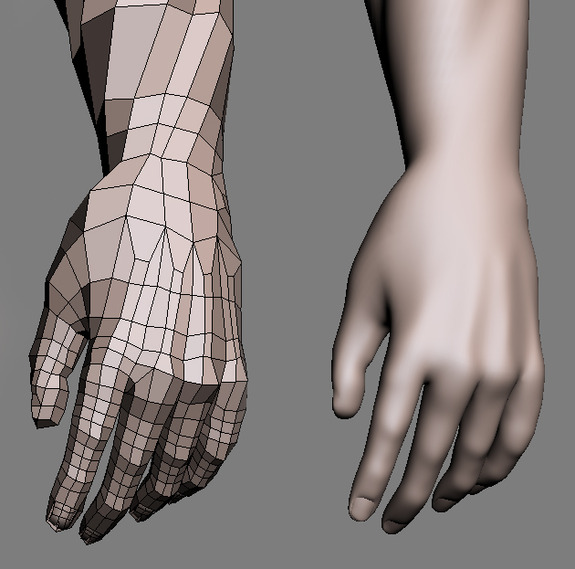
Hand topology
Tuesday, July 2, 2013
tutorial with good topology
if you search a tutorial with good topology , i think sampad tutorial from youtube is the best tutorial
Friday, June 28, 2013
Second key modelling concept
-->
The second key modelling concept covered here is spacing your geometry uniformly. This will give the most predictable surface possible when subdividing your creature's geometry. Subdividing can occur not only while modelling, but also when refining subdivision surface, when applying a polySmooth, or when the model is subdivided by the renderer at render time.
The advantage of having uniformly spaced geometry with a higher poly count are far greater than a mesh that has irregularly spaced geometry and less polygons. an evenly spaced geometry will also make the rest of the character pipeline much easier. Texture artists will experience a minimal amount of texture stretching on a surface that has uniform spacing compared to irregularly spaced geometry.
Character set up artists will have an easier time binding the model due to evenly distributed weight values to uniformly spaced geometry compared to geometry with irregularly spaced rows of edges.
Thursday, June 27, 2013
Key Modelling part 2
-->
Part 1
To avoid geometry bunching up around the armpits, the human;s upper torso should be modeled a little differently than how it naturally flows. It is a good idea to have the edge loops flow along the pectoralis muscles into the deltoids and then to the back like a cape. This cape layout has the potential of deforming extremely well when the arms reach above the head and when they are in relaxed position.
In the following image, they are many directional changes around forearm, biceps and triceps. The trick is to try to build enough of these muscles without the arm being perfectly anatomically correct. Some areas are implied rather than built to keep the geometry efficient and uniformly spaced.
and now modelling a leg
Modelling the leg muscles is a good exercise for determining which muscles to build and what you can get away eith. You can imply good portion of the muscles just by sculpting with artisan since most of the leg muscles travel vertically. Always evaluate what needs to be modeled and what does not. You should only concentrate on modelling what will pay off in the final render.
To avoid geometry bunching up around the armpits, the human;s upper torso should be modeled a little differently than how it naturally flows. It is a good idea to have the edge loops flow along the pectoralis muscles into the deltoids and then to the back like a cape. This cape layout has the potential of deforming extremely well when the arms reach above the head and when they are in relaxed position.
In the following image, they are many directional changes around forearm, biceps and triceps. The trick is to try to build enough of these muscles without the arm being perfectly anatomically correct. Some areas are implied rather than built to keep the geometry efficient and uniformly spaced.
and now modelling a leg
Modelling the leg muscles is a good exercise for determining which muscles to build and what you can get away eith. You can imply good portion of the muscles just by sculpting with artisan since most of the leg muscles travel vertically. Always evaluate what needs to be modeled and what does not. You should only concentrate on modelling what will pay off in the final render.
Good topology
-->
The third key modelling concept covered here is to maintain quad topology as much as possible by doing so. it benefits you and everyone in the character pipeline for many of the same reasons as listed above. Quads benefits the modeler by getting a predictably smooth surfae when subdivided, they benefit the texture artist by securing the texture placement and minimizing stretching and they allow the set up artist to evenly distribute or paint weight values to quads rather than triangle or n- sided polygons
There will be times when you will have to sacrifice one ot more of these key concepts in order to maintain a quad layout, especially when modelling according to anatomy and muscle flow. It is then up to modeler to decide to do discontinues some of these extra edge loops by using triangle on the mesh.
Following are some typical problems encountered while modelling , along with solutions to correct the topology with quads. Once the topology is corrected, you can use tools such as artisan to smooth out the edges and get a seamless result.
If you do have triangle on your model, make a conscious effort to hide them in unobtrusive places. N-sided polygons are not recommended either and should be split manually, since it is difficult to predict exactly how the surface will react when subdivided, textured or bounded; it might ultimately flicker when deforming during animation.
Subscribe to:
Posts
(
Atom
)