Monday, November 3, 2014
Tuesday, October 28, 2014
Monday, October 27, 2014
make another circle burst with after effect
in the decade we have to change our sense.. because flat sense is coming
here we are.. we bring one of the flat sense..
here is tutorial how to make circle burst
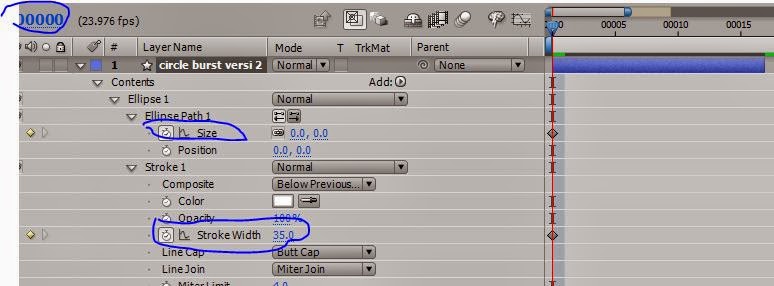
1. make your own circle like this.. without fill but still use stroke with 35 px , klck on the first blue circle and set like second rectangle and draw like number 3
3. in the 15th frame set like this
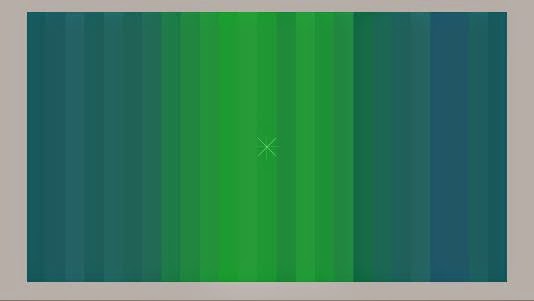
soo u can see ,.... this is the result.. nice right ???
here we are.. we bring one of the flat sense..
here is tutorial how to make circle burst
1. make your own circle like this.. without fill but still use stroke with 35 px , klck on the first blue circle and set like second rectangle and draw like number 3
2. in the first frame ... set circle burst version 2 like this
3. in the 15th frame set like this
soo u can see ,.... this is the result.. nice right ???
Thursday, October 23, 2014
Makecircle burst in after effect
In the motion graphic there always change.. and this is trending now.. circle burst .. i wanna teach you how to make circle burst in after effect here is the motion graphic will be seen

now we have to make a line... first
here is the tutorial
1. make rectangle tool or "Q" oon the keyboard and set the rectangle like this
2. move your time accelator on the next 12 frame and set like this
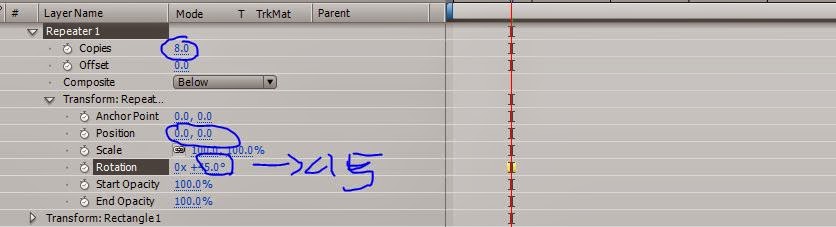
3. add the repeater and setting
and here we are.. play that and u will see. if looking for answer let me know and comment this blog ..
thanks everyone
Tuesday, October 21, 2014
Friday, September 5, 2014
how to animate image and text in after effect with puppet tool
1. Open After Effect make a new composition or type ctrl+ N on the keyboard
2 We will try to make a moving text animation in after effects
3 Click above "T" to create a new text
4. Write 3dindonesia.blogspot.com, then click tools like puppet in the picture
5. Then click on the letters to be animated like in the example
6 Click on the text that's been made type "u" on the keyboard to see its keyframe
7 Move the timeline seconds to seconds later and change the position kuning2
then press play to, see that animation
if there are any questions please comment
2 We will try to make a moving text animation in after effects
3 Click above "T" to create a new text
4. Write 3dindonesia.blogspot.com, then click tools like puppet in the picture
5. Then click on the letters to be animated like in the example
6 Click on the text that's been made type "u" on the keyboard to see its keyframe
7 Move the timeline seconds to seconds later and change the position kuning2
then press play to, see that animation
if there are any questions please comment
Saturday, August 30, 2014
Make you own After Effect Plug in
Creating a plug-in After Effects is not an easy thing but not too difficult case. because what in the world that can not dilakuin .... Make Plug-in After Effects there are at least three ways, namely with Pixel Bender, Quartz Composer, and After Effects SDK
1 Pixel Bender
Pixel Bender is made by Adobe to help the developer or developers to memanimpulasi
kernel image / image. Using XML language is easy to learn for those of you who never learned about programming, or for those of you who have not been studying programming.
pixel bender technically not actually make "plug-in", but After Effects files fixel bender recognize and enforce the file as an "effect"
Pros: Easy to learn, supports all versions of After effects
Disadvantages: can not access to After effects camera, limited control, each pixel in the load itself
2 Quartz Composer
Pros: Easy to learn, no need to write coding
Disadvantages: only MAC
3 After Effects SDK
Pros: Controls are endless, very nice
Disadvantages: Difficult Learned, should be a lot of exercise and error
1 Pixel Bender
Pixel Bender is made by Adobe to help the developer or developers to memanimpulasi
kernel image / image. Using XML language is easy to learn for those of you who never learned about programming, or for those of you who have not been studying programming.
pixel bender technically not actually make "plug-in", but After Effects files fixel bender recognize and enforce the file as an "effect"
Pros: Easy to learn, supports all versions of After effects
Disadvantages: can not access to After effects camera, limited control, each pixel in the load itself
2 Quartz Composer
Pros: Easy to learn, no need to write coding
Disadvantages: only MAC
3 After Effects SDK
Pros: Controls are endless, very nice
Disadvantages: Difficult Learned, should be a lot of exercise and error
Subscribe to:
Posts
(
Atom
)